
Super Website Checker & Website Makeover
Business Intelligence at It's Simplest.
For the Sherlot Holmes Challenged - Simple steps to check out any website - including your OWN! Want to see how a search engine spider views your site? Want to do a joint venture but not sure of a particular website's stats or creditability? Want to check out your competition for certain keywords in the different search engines before you trade links? No problem. Just use this page of handy FREE links to collect information on a particular site.
**** NEW ****
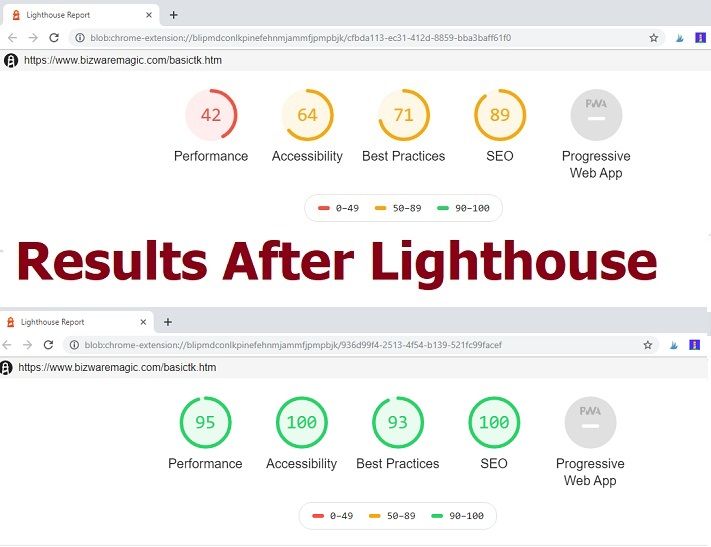
 Google LIGHTHOUSE Open Source Tool for improving any webpage. Essential if you want to "improve" the performance of your site. Just download this Google Chrome Extension - Open an Incognito URL and run Lighthouse
to check your webpage. You will get Performance - Accessibility - Best Practices - SEO and PWA (Progressive Web App) Scores. PLUS - detailed information on HOW to fix any issues with your page. Must Have Tool For Ranking In Google.
Google LIGHTHOUSE Open Source Tool for improving any webpage. Essential if you want to "improve" the performance of your site. Just download this Google Chrome Extension - Open an Incognito URL and run Lighthouse
to check your webpage. You will get Performance - Accessibility - Best Practices - SEO and PWA (Progressive Web App) Scores. PLUS - detailed information on HOW to fix any issues with your page. Must Have Tool For Ranking In Google.
Check Out That Site! - Sites will open in new windows.
 Whois First, see who owns a particular site. Contact info available - please note because of unscrupulous harvesters, e-mails addresses are sometimes unreliable.
AnyBrowser Check out your site's Browser Compatibility with this link. Screen size test, site viewer, link check, etc. Find out how others see your site.
NetMechanic Check for load times, browser compatibility, etc.
Alexa Check for traffic rank and Stats. Contact info - cross reference with Whois information.
Wordtracker Wordtracker or Keyword tracker - Find out how many hits/searches your main keywords get in a day! Use this to analyze the effectiveness of a site's keywords i.e. a number ONE ranking for a particular keyword in Google that get zero searches is useless.
Google Bar! Install this toolbar and find out the PR (Page Rank) of your competitor's site. Happy Spying!!
Extreme Makeover for Your Website!
Is your site successful? Is it bringing in tons visitors each day?
Is it making a profit? Is it winning rave reviews from friends and
visitors alike? If you answered 'no' to all of the above -- don't you
think it's time for you to take a serious look at your website?
Don't you think it's time for a tuneup?
Website TuneUp Kit!
Is your site successful? Is it bringing in tons visitors each day? Is it making a profit? Is it winning rave reviews from friends and visitors alike?
If you answered 'no' to all of the above - don't you think it's time for you to take a serious look at your website?
If you're not satisfied with it - do something about it!
Don't you think it's time for a makeover?
Word of caution, if your site is working perfectly - don't touch it. If it ain't broke - don't fix it. Stop reading - go do something else!
On the other hand, if you need help or if you just want to improve your website - here's a quick tune-up you can try.
First, take a general overview of your site. What is subject matter of your site - define it down to a particular topic - your niche.
For instance, you can have a website on Sports. You may have narrowed it down to a particular sport - say baseball. You may have even narrowed it down further - a particular baseball team.
Whatever the subject matter of your site, keep the content within your site on topic. Obvious but important. Someone coming to your site to check out the Yankees - don't want to find material on 'how to hook a rug'!
Keep your site on topic.
Next consider your audience - who is it aimed at. Who are you targeting. For instance, if it's a general news site - it's may be the whole world. Everyone is interested in the news.
If it a website on breeding dogs - your audience is probably other dog breeders or those interested in dog breeding. Someone visiting your site will expect to see content/information on dog breeding.
Keep your site's audience in mind at all times.
Now consider the layout and design of your website. Is it appropriate for your topic and for your audience. Does the color scheme and design suit your subject matter? Does the design and layout suit your audience?
A website catering to young visitors offering online role-playing games is not going to have the same layout or color scheme as a conservative business site. Appeal to your audience and subject matter - again, keep them in mind at all times.
In your site design go for simplicity. Don't complicate them with too much flash and dazzle. Provide your visitors with what they're looking for - and make it quick. Don't have your visitors jump thru hoops to get what they're searching for. Have an 'easy to navigate' linking structure.
Keep the overall design within two or three colors. You can even try an old artist trick - make it almost monochromic with a complimentary color split to bring focus to your points of interests. Make sure your fonts are consistent and easy to read on all the different browsers. Keep the same logo or brand name on all your pages - don't confuse your visitors.
Keep your pages 'keyword focused' - make sure all the content and information on a particular page relates to your keyword for that page.
Now, lets get down to some specific changes or additions that can 'tune-up' your website. These should improve the professional look and feel of your site.
Give Them Something to Remember You By
1. Make a 'favicon.ico' file if you don't have one. Look down at your computer's task bar - you should see a version of a favicon of the programs on your computer. These are small '16x16' icons or symbols for your site or product. All major sites have them. Here's how you can make them:
Use a photo or paint shop program like Adobe or Paint Shop Pro. Just take your logo or part of it and reduce it down to a 16 x 16 image. Adjust the resolution and play around with it. You can just use a single letter from your site's name and jazz it up a bit. You need to save this image in an ico file named --- favicon.ico --- logical Mr. Spock!
Give Them Eye Candy 2. Make a logo. Or have someone design it for you. Nothing says professional than a cool looking logo! A really good one will brand your site in the minds of your visitors. Have this logo on all your web pages.
Put Them on the Map 3. Make a Sitemap for your site. Extremely important, make sure you have a sitemap for your website. Place all the links (if possible) to your site on here. It will unify your site and be of tremendous benefit to your visitors. It's a common courtesy you cannot, must not ignore. Ideally, you should have a link to your sitemap on all your web pages.
Redirect Them 4. Redirect Page. Create a redirect or error page if your web host doesn't provide one. This is a catch-all page for the '404 Not Found File' that pops up. It will make your site more professional - plus, you won't lose all those hard fought for visitors. Make sure your Redirect Page has a link to your Sitemap. Try this link for help: https://www.clockwatchers.com/htaccess_redirect.html
Blog Them 5. Start a Blog and RSS Feed for your site. If you haven't placed a blog on your site - do it now! This is one addition to your site you should have. Start a blog on the subject of your site or something complimentary to it. It will allow for visitor interaction and will give your site a boost in the ratings. (Use the link at the end of this article if you need help with setting up a blog.) RSS Report and Create Blog Guide.
It will also give you a RSS Feed which will allow you to syndicate your site's information or content. Place an orange RSS or XML button on your site. Since RSS is somewhat new - you might want to place a little note explaining xml or the rss feed. Always place your visitor's comfort in the forefront.
Send Them to the Doctor 6. Doctor HTML - check the html code and spelling of your site. Sites like this one are great. They will give you a tune-up for free! I have used this one and it's excellent. What you're really checking for is browser compatibility and broken links. It will also squash your html to save on your load time. It will check the coding and any spelling mistakes on your site.
Correct any blatant 'faux pas' in your site's coding.
You can find the html doctor here: https://html.validator.pro/
You can also go to NetMechanic to reduce the graphics on your site. As the net goes broadband - this is becoming less and less a problem but it's always better to have a fast loading site.
GifBot by https://www.netmechanic.com/products/accelerate.shtml
Keep Them Browsing 7. Next check your site in all the browsers. You might be surprised how your site looks in a different browser. Firefox is increasing it's users - check your logs - see which browsers your visitors are using. Make sure your site looks and operates in these systems.
If you have a lot of friends with computers, check your site on their operating systems and see how it looks. Make any necessary changes. You can also try AnyBrowser.com Screen Size Tester - AnyBrowser.com.
Give Them Spider Food
8. Spend a day or so - checking all your keywords. List down your site's major keywords. The ones you're targeting. Optimize for the search engines. Most of the traffic on the web come from search engines - make sure your site is optimized for them. Make sure you have submitted your site to all of these engines.
Find some great Search Engine Optimization Tools here:
www.webconfs.com
Give Them A Gentle Reminder
9. Make sure you have a Bookmark link. Simple but many websites don't actively encourage visitors to bookmark their site. Have a bookmark logo or link on all the pages of your site. Remind your visitors to bookmark. It's a great source of free traffic. You can get a free script from Michael Bloch: www.tamingthebeast.net
Give Them Some Jazz
10. Jazz up your site! Try to find things that will make your site interesting. Give your visitors a reason to visit your site other than the great content. Offer a free service - like the one the doctor uses above! Run a contest! Give away free stuff or extra bonuses if they visit your site. In whatever way you can - make your visitor feel special.
Maybe try a headliner from Feedburner.com for your rss feed. This will display all your headlines. Add other graphics like the ones mentioned here - favicon, bookmark, sitemap, etc.
But don't overdo it with the graphics, but add a few to make your site visually interesting. Even a visually bare-bones site like Google does this with their logo on special occasions. It adds a touch of style.
It is estimated that over fifty percent of net users now have broadband so the use of a lot of graphics is not as detrimental as it once was. But again, don't over do it - a little spice goes a long way.
But don't put style over substance. It all boils down to content. Give your visitors good valuable content or information and your site will improve faster than with all the points mentioned above. Don't forget that basic ingredient while you're fine tuning your site.
And don't forget your site's visitors. Make their visit to your site as pleasant and comfortable as you possibly can.
Always keep your visitor in mind.
Each one is a special guest. Each one deserves the best site you can produce. Each one is ...
A VIP with a cursor! Give them the Royal Treatment!
Your site will reap the benefits.
----
To Create a blog within minutes - visit this link:
RSS Report and Create Blog Guide.
Copyright 2005 Titus Hoskins of bizwaremagic.com.
Visit www.bizwaremagic.com
for more simple solutions to your online marketing tasks.
----
Please bookmark with social media, your votes are noticed and greatly appreciated:

 My name is Titus Hoskins and I am an artist, writer and webmaster. I am also a
former art teacher who has
been a full-time Online
Professional Marketer for the
last 10 years.
My name is Titus Hoskins and I am an artist, writer and webmaster. I am also a
former art teacher who has
been a full-time Online
Professional Marketer for the
last 10 years.
Bizwaremagic.com is my main website, but I have
many more. You can follow me on Twitter or Linkedin.
Please Note - As per FTC guidelines, readers should be aware this is an affiliate site and may receive small payments (at no cost to you) from featured companies.

Please feel free to contact us.
contact@bizwaremagic.com
Copyright - All Rights Reserved.
