Presenting The Information You Need...
Notebook Computer Guide*
Quick... Reviews... Summary...
Become An Educated Buyer & Save
*HP Envy 17 Compiled Review
Close Look at the HP Envy 17:
When HP acquired Calgary based Voodoo Computers or VoodooPC back in 2006, many gamers wondered what part Rahul Sood's Voodoo would bring to HP. Now we are seeing the off-spring of this union in some very high-end laptops like the Envy 13, Envy 15 and now the HP Envy 17. No doubt, this influence is still there since according to Wikipedia, Rahul Sood also became the "Chief Technology Officer for HP's Global Voodoo Business Unit" and we have already seen some top gaming desktops with Voodoo DNA, such as the HP Blackbird.
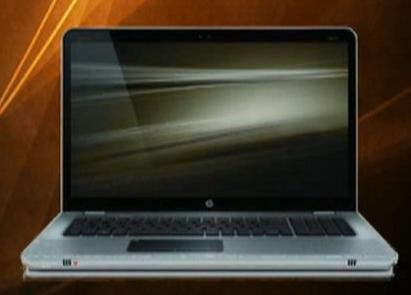
Now we have the Envy 17, a high-end gaming laptop or multi-media desktop replacement with some very impressive specs and features. This is the follow up to the Envy 15 series of laptops which came out a while back.

First, most buyers will be impressed with the sleek magnesium casing covered with aluminum which is further enhanced with laser etching both on the exterior and interior. Some critics have pointed out the style of the Envy 17 too much resembles the MacBooks... but regardless the Envy 17's styling adds a touch of class without being too flashy, a common requirement for these high-end gaming rigs. So too is the backlit keyboard which is present on this laptop.

Next, this HP Envy gaming laptop has some good features such as the dedicated ATI Radeon HD 5850 GPU with 1GB of ultra fast DDR5 VRAM and DirectX 11 graphics. The ATI Eyefinity multi-display technology, lets you have three external displays via the DisplayPort, VGA and HDMI ports. This is the feature that is most often demo-ed when showing the kind of gaming possible with the Envy 17.
Graphics Card
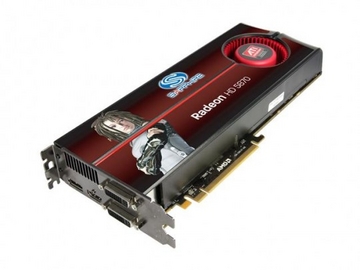
While the ATI Radeon HD 5850 GPU is not as powerful as the Radeon HD 5950, the 5850 is still one of the fastest single-GPU graphics card on the market. This card has an 850MHz GPU, 1GB of 1,200MHz DDR5 memory, plus 1,600 stream processors which is double that of the Radeon HD 4870. Here's a very good review of this GPU from HotHardware.com: ATI Radeon HD 5850 Review It should also be noted that while DirectX 11 will be important for future gaming, only a few current games have it: BattleForge, Dirt 2, and S.T.A.L.K.E.R.: Call of Pripyat.
Performance Benchmarks
Some early users report FPS of 17-20 playing Crysis at HIGH settings, 4x AA and 1600x900.
Running 3DMark06 (DirectX9):
11449 3Dmarks,
4485 SM 2.0 score
5513 SM 3.0 score
3104 CPU score
Running 3D Mark Vantage (DirectX10).
3DMark Score: 6246
CPU Score: 7952
Graphics Score: 5829
You have a 17.3" display which has an optional Full HD 1080p Ultra BrightView Infinity LED Display (1920 x 1080) for $100 extra, which is one option that should be upgraded. Up to an optional slot-loading Blu-ray ROM Drive and you also have a HP TrueVision HD Webcam with an integrated microphone, you also have video chat live using your HP ENVY 17-1011NR.
Another selling point is the premium Beats Audio with a triple bass reflex subwoofer for virtual surround sound/music. Laptops, even high-end gaming laptops, are not usually know for producing quality sound, so this Beats audio system should be a big PLUS.
All the above features are pointless if you don't have the power to drive them, so under the hood we have different configurations ranging from the basic starting specs:
Intel(R) Core(TM) i5-430M Dual Core processor (2.26GHz, 3MB L2 Cache) with Turbo Boost up to 2.53GHz + 4GB DDR3 Memory for around $1399.
To the high end specs:
Intel(R) Core(TM) i7-820QM Quad Core Processor (1.73GHz, 8MB L3 Cache) with Turbo Boost up to 3.06GHz + 8 GB DDR3 Memory for around $2,349
Now a 500GB 7200RPM SATA Hard Drive with HP ProtectSmart Hard Drive Protection is included in both those prices. But as every gamer knows if you want to upgrade to other options it will cost you. Upgrading to the full 1080 and Blu-ray will cost you around $250 more and should be considered if you want the best bang for your entertainment dollar. Another popular upgrade is the SSD (Solid State Drive) which has no moving parts so it will last longer than a HHD . Some users have very fast boot times with the SSD upgrade.
Ports
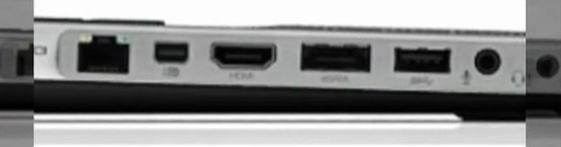
The ENVY 17 offers a whole range of high-speed ports & wireless connections. With this laptop you get:
Intel draft Wireless-N Wi-Fi2 with optional Bluetooth
Integrated 10/100/1000 Gigabit Ethernet LAN for a high-speed connections
A Mini-Display port for connecting a super HD display
An HDMI 1.3c port for connecting a monitor or HD TV3
A SuperSpeed USB 3.0 port which gives you data transfer up to 10 times faster than USB 2.0
Three USB 2.0 ports (one is shared with the high-speed eSATA combo port)
1 Headphone-out/Microphone-in combo jack
A 5-in-1 digital media card reader
Battery Life
According to the HP site, the 6-cell Lithium-Ion battery will give you up to 2.5 hours, or you can buy the 9-cell for $75 extra which will give you up to 3.75 hours. View those times with some skepticism, as gaming puts a lot of demand on your system. Also remember, the i5 specs will give you longer battery life depending on your usage. The 9-cell battery fits neatly under the laptop but this is NOT the same as the "slice-battery" seen with the smaller Envy 13 and 15 laptops... where the battery fitted cleanly over the bottom of the laptops, so that you didn't notice you had an extra battery. However, the extra battery should help with another issue discussed below.
Heat Issues Dealt With?
As you may or may not be aware, HP had a lot of complaints/issues with heat coming from the powerful processor in the Envy 15. Since many used this laptop for intensive gaming which produces a lot of heat, but overheating is an issue that buyers shouldn't have to deal with on any laptop, gaming or otherwise. While buying a cooling pad will help matters somewhat, please note - excessive heat is a common problem with many high-end machines and the main reason why true gamers claim a laptop should never be used for gaming - go with a gaming PC instead.
Now, HP has said it has minimized these heating issues in the Envy 17 by repositioning the internal components in order to optimize cooling. In addition, they have added extra vents to the newer Envy 17 model to further cool things down. While the Envy 17 has only one cooling fan (the 15 has 3 fans) initial feedback from some users suggest still runs hot but it doesn't interfere with typing or use of the laptop. One user stating "RealTemp shows the CPU at 55C idle and 82C while gaming" see links below.
Most of the heat is now located in the top left corner of the laptop. In the Envy 15, many users found they couldn't use the left hand side because it was simply too uncomfortable. Here are links to several Envy 17 users regarding the heat issue on this laptop.
And this is review from an Amazon customer noting that the left hand corner shows excessive heat but typing or using the laptop is not a problem.
Of course, heating or running hot is a common issue with many high-end gaming notebooks. Cram all those powerful professors and GPUs into a small space and you're just asking for trouble. One possible solution which could help minimize the problem is purchasing an inexpensive cooling pad.
(Please Bookmark this page - any reports/feedback on heating problems will be updated and listed here.)
Fan noise wasn't that noticeable or didn't seem to be a problem with many of early users of this laptop. The touchpad was also another issue with many Envy 15 users - many felt it was too finicky and not up to the quality other touchpads in high-end machines such as the MacBook Pro. The Touchpad in the Envy 17 is not sparking a loud outcry from many early users.
Overall Conclusion:
While the heating and touchpad should be checked out by potential buyers before they buy, this is one of the most stylist multimedia laptops HP has produced, especially with the magnesium casing covered with aluminum and then laser etched. Classy not flashy. Even the basic model will give you all the main functions and features, but it is strongly suggested you upgrade to the full 1080p and Blu-ray system for maximum viewing enjoyment. The new high-end i5 and i7 processors with their Turbo Boost systems should give you amble power for playing most, if not all modern video games. Throw in the dedicated ATI Radeon HD 5850 GPU sporting 1GB of ultra fast DDR5 VRAM with DirectX 11 graphics and you have a very capable gaming rig. Lastly, when you consider the ATI Eyefinity multi-display technology which gives you gaming on 3 displays then the Envy 17 opens up a whole new era in laptop gaming.
Helpful Resource:
Envy 17 Service Manual http://h10032.www1.hp.com/ctg/Manual/c02160120.pdf
*Seclective Quality Reviews: HP Envy 17
Use these handy Quality Review Links for more detailed information and reviews here:
- Notebookreview's HP Envy 17 Lounge Excellent Resource
Online Comparison Shopping For: HP Envy 17
Buy directly from HP.
...Listed above are some online Stores to buy the HP Envy 17. Most of these have Daily Updated Prices so it's best to visit these sites and shop around. Watch out for Special Shopping Cart Deals! But don't go for the cheapest price - also check out the customer service and support.
Basic Starting Specs for HP Envy 17 -
- Intel(R) Core(TM) i5-430M Dual Core processor (2.26GHz, 3MB L3 Cache) with Turbo Boost up to 2.53GHz
- 4GB DDR3 System Memory (2 Dimm)
- 500GB 7200RPM SATA Hard Drive with HP ProtectSmart Hard Drive Protection
- 1GB ATI Mobility Radeon(TM) HD 5850 Graphics
- Genuine Windows 7 Home Premium 64-bit
- Beats internal stereo speakers
- Starting Price: $1,399.99
ALWAYS DOUBLE CHECK THE EXACT SPECS -with dealer- Before you BUY!
Further Information:
*Product or Company RSS Feed: Unknown or Unavailable
PC Mag RSS Feed
RSS Feed
What is RSS? RSS stands for Really Simple Syndication. Companies and Websites use it to syndicate their information. To access these Feeds you can use Aggregators or Readers like NewsGator. Other options, you can use the New Firefox Browser or use online sites like MyYahoo or Bloglines.
The Notebook Guide

CLICK To View Our TOP HAND-PICKED Quality Laptops:

Copyright - All Rights Reserved.


To access our Notebook Guide just click the link below OR you can DOWNLOAD this handy PDF file by right clicking the link. Free Notebook Guide
Notebook Guide
Information Overload
The Internet has too much Stuff!
We Sort and Compile all this information for you and present a brief Synopsis or quick Summary of product reviews.
Break through the Clutter.
Use this Easy Guide to point you in the right direction and save your most valuable asset.
Time.....................
Quick TimeSavers

Yes, as per FTC rules and full disclosure - this is an affiliate site and may receive small compensation for links clicked on this page.